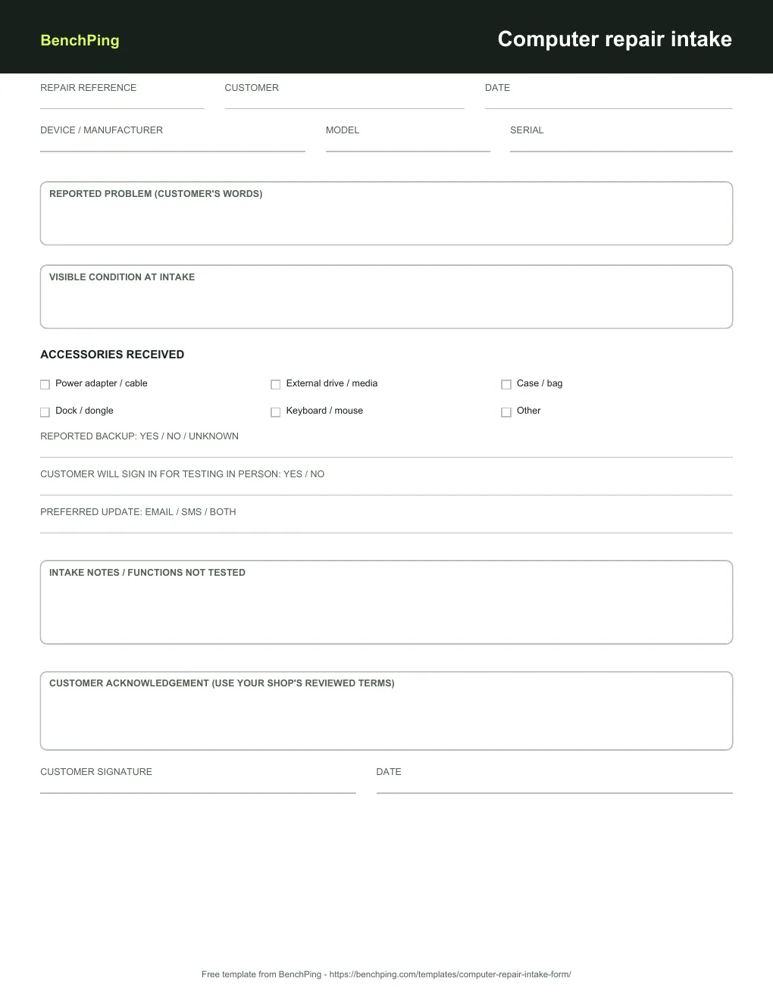
Download the computer repair intake form
Use the form at the counter or include a blank copy in a mail-in intake package. Completed forms contain customer and device information, so store and dispose of them through your shop’s private records process.
Download PDF (Letter)Download PDF (A4)Identify the computer and what arrived
Record device type, manufacturer, model and serial identifier when the shop needs it. List every accessory received, such as a power adapter, external drive, case, dongle or detachable keyboard. Keep the customer’s reported problem separate from the technician’s diagnosis.
Describe visible condition factually: cracked casing, missing screws, liquid residue, damaged ports, swelling or signs of earlier opening. Photograph only relevant received condition, and avoid capturing an unlocked desktop, messages, documents, payment details or other unnecessary personal information.
Arrange testing without a password field
The form has no password, PIN or recovery-key field. Instead it asks whether the customer will sign in for testing in person. If another access method is genuinely required, use a separate shop-approved secure procedure rather than a paper intake form, ordinary repair note or customer-visible message.
Record whether the customer reports having a current backup and what update channel they choose. Do not imply that the shop verified a backup unless staff actually did so. Explain which functions could not be tested at intake and preserve that distinction through the final handoff.
Use the same reference for counter and mail-in work
For a shipped device, record the inbound parcel reference, package condition and accessories before the device moves to the bench. Keep outbound shipment and handoff details with the same repair reference. Confirm who owns customer communication if a specialist or data-recovery provider becomes involved.
At collection or return shipping, reconcile every received accessory and summarize the completed work and actual test result. BenchPing supports job tracking and updates; it does not replace data-recovery consent, regulated documentation, warranties or the technical records required by your shop.
Mail-in repair trackingComputer repair shop workflowPhone repair intake formMore free repair shop templatesCommon questions
Should the form collect a computer password?
No. Arrange for the customer to sign in for testing in person or use a separate approved secure process when access is genuinely necessary.
Can I use the form for a mail-in computer?
Yes. Add parcel references and photograph relevant package condition while keeping the completed form and images private.